Customer contract data fuels many powerful Productiv insights. If you have basic user privileges you can see some information related to contracts and spend data. However, if you have at least app admin privileges, you can use uploaded contract data to:
- create workflows that regularly assess whether all licenses that are assigned, are really being used;
- create workflows that can reclaim licenses that are not really being used;
- manage all your SaaS contract renewals;
- examine your company's provisioned spend for SaaS applications by time period, by team, or by individuals; and
- leverage specific line item data in your contracts to obtain advanced rightsizing and provisioning recommendations.
Previously, the procedure for uploading, ingesting, and then validating contracts in Productiv did not supply an automatic feedback loop to tell users when their contracts had been uploaded, or even which contracts were still in the queue. Also, there was no flag to show that ingested contracts had been checked and approved.
Productiv has now rolled out enhanced contract validation that creates better checks and balances between our customers and the Productiv contract ingestion team.
Phase 1 of this enhancement creates clear communication to users on contract upload status that lets them know:
- when their contracts have completed processing (and which are still in the processing queue), and
- if there are problems with specific contracts that need to be addressed.
These communications also strongly advise them to validate their uploaded contracts, and make it easy for that to happen.
Links in the emails make it easy to view the and approve the ingested data.
How does this work?
After you upload one or more contracts, Productiv sends you email to update the status of the uploaded contracts.
If all contracts were ingested successfully, Productiv sends a "Contracts need attention" message, inviting you to review the uploaded contracts and approve them.
If any of the contracts you uploaded were not ingested (for example, if the uploaded documents were not SaaS contracts), Productiv sends a "Contracts not ingested" message which lists those documents.
What if I don't see the email?
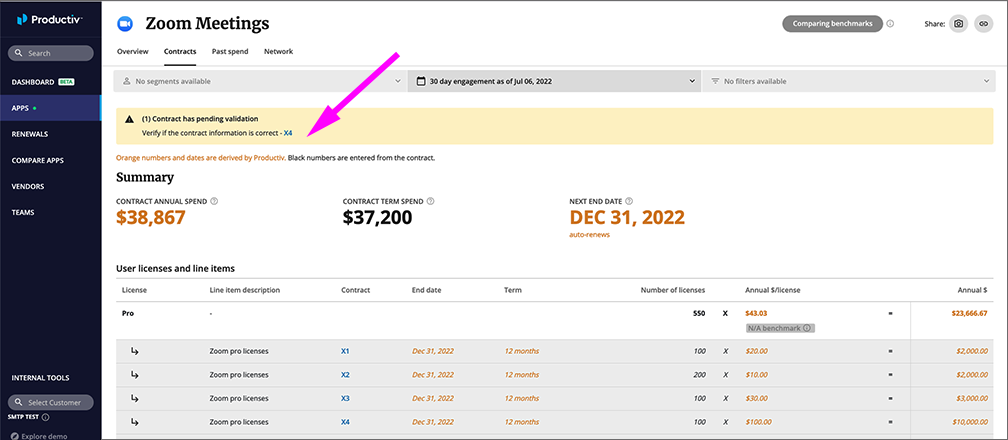
Status information about uploaded and ingested contract data is also presented on the app's Contract page, in a banner. To view the uploaded contracts to be validated, click the link in the banner.
Read more
For an overview of how contract data is used in Productiv, see Contracts overview.
Comments
0 comments
Please sign in to leave a comment.