Productiv now provides a wider range of rolling windows for SSO app provisioning workflows.
Previously you could configure automated workflows to demote or deprovision apps behind SSO at intervals of 30, 60, or 90 days of inactivity. Now you can also set up workflows to operate at intervals of 120, 150, or 180 days.
Where can I see the change?
The change is visible during provisioning workflow setup for any App managed by SSO.
How can I try it?
When defining a new rule for an existing provisioning workflow, or modifying an existing rule, you go to the App page's Automation tab.
In the Provisioning workflow section, under Workflow rules, you click + Add new rule to set up the logic the workflow follows when it identifies users to be deprovisioned from the app due to inactivity.
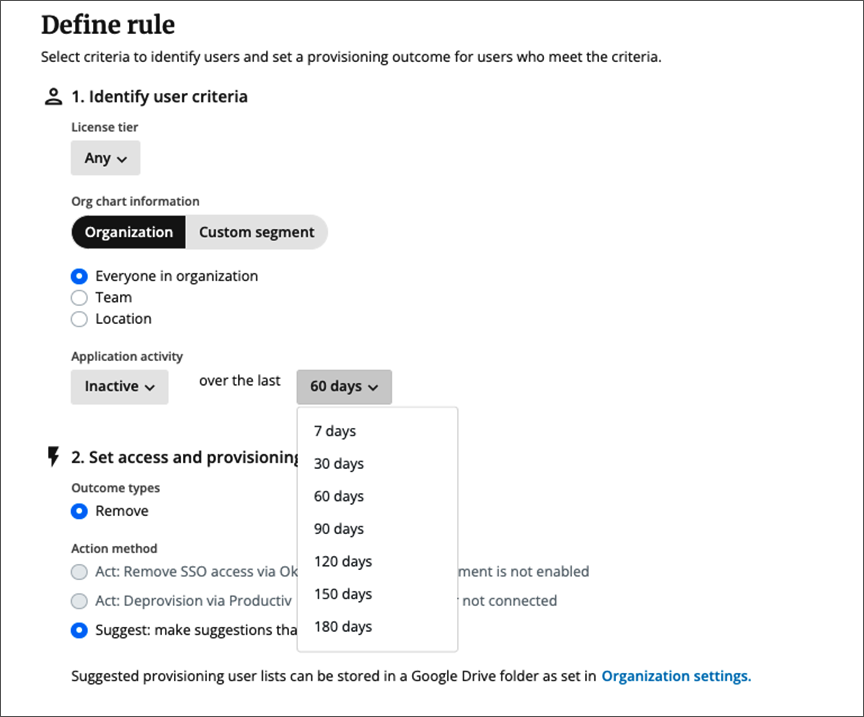
The new 120. 150, and 180-day intervals appear in the drop-down for specifying the period of inactivity.
See also
For a detailed description of how workflow rules are arranged, see Define rules for provisioning workflows.
Comments
0 comments
Please sign in to leave a comment.