Productiv has released a new dashboard widget. The Spend widget enables you to track expense spend, invoice spend, or both, for an interval tailored to your company’s own fiscal year.
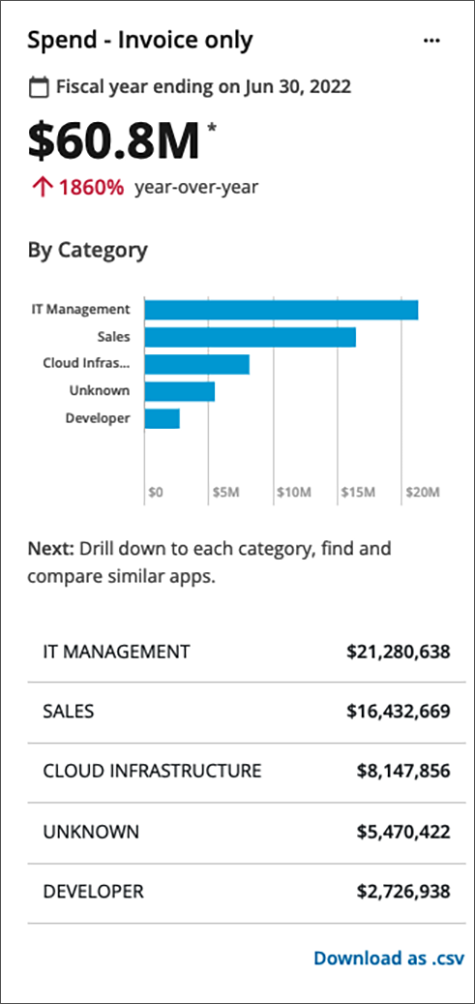
Spend widgets can be set up to show both expense and invoice expenditure, only expenses, or only invoice. The expenses can be ungrouped, or grouped by app, category, or vendor. (The categories correspond to the categories shown in the App list.)
Depending on how you set up your widget, the resulting display might be a line graph or a bar graph, which you can preview during widget setup.
You can configure multiple Spend widgets, for a quick view of several types of expenses over various fiscal years.
Just as in other areas of the Productiv app, you can download your spend widget data as a .csv file.
How can I try it?
The Spend widget is already present in your Dashboard, located in the third position of the widget grid. (Grid positions, shown in yellow below, are editable.)
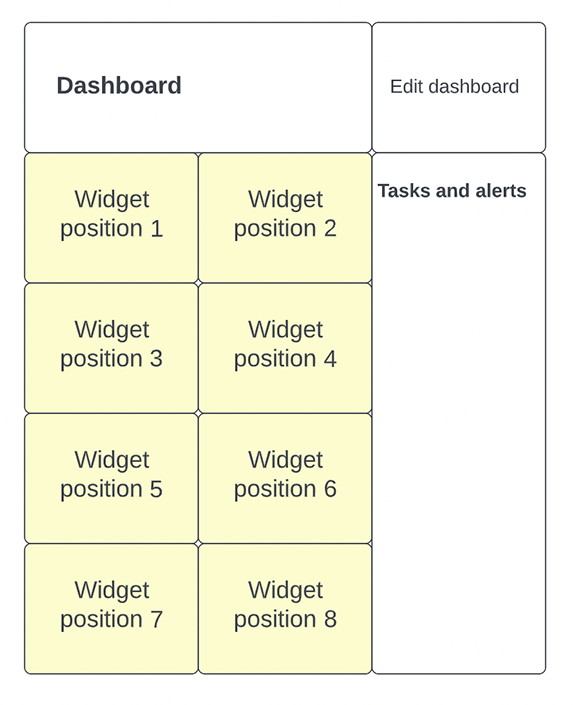
You can reposition this Spend widget anywhere you like within the widget grid. For a quick look at how to edit the dashboard, see Dashboard overview.
Read more
For a complete description of the Spend widget and how to configure it, see Spend widget.
For a description of how to edit the dashboard and a list all available dashboard widgets, see Dashboard overview.
Comments
0 comments
Please sign in to leave a comment.