Investigate suite details by individual app
Compare engaged users for apps in a suite in the Apps in this suite table on the Overview page. Each app in the suite is listed with the following additional details:
- App - the name of the app with the number of instances or name of the selected instance, if applicable
- Sub-category - the type of app
- Engaged Users/Unique Logins - the number of engaged users or unique logins (if available)
- Compliance count - of the number of compliance certifications Productiv tracks, the certifications that apply for each app
Note that when viewing a specific instance of a suite when there are multiple instances of an app, the Apps in this suite table only show apps related to the selected suite instance.
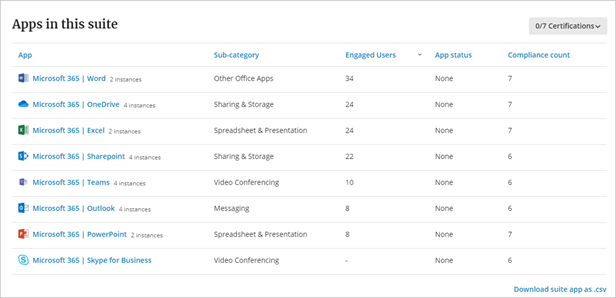
Select an app name to open the App Overview page to see details for that individual app.
Select Download suite app as .csv to send data to a .csv file.
Comments
0 comments
Article is closed for comments.