Roll-up reporting is the practice of aggregating information from all available instances of an app, into a single report. Roll-up reports appear in the App overview page (each row of the table) and in the app-specific reporting section.
Formerly, Productiv treated Google Social Login activity the same way we treated SSO login activity from a managed SSO provider such as Okta. That is, we created a new instance for Social Login activity, and then combined it with managed SSO activity in a roll-up. There was no way for us to separate managed Google Social login activity from managed SSO activity.
On May 3, 2022, Productiv introduced a change that separates Google Social login activity from managed SSO activity. Instead of rolling them up together, we will show Google Social login data as a separate data source that users can select and view, similar to engagement data and managed SSO data.
Where can I see the change?
This change shows up as a new Data Source option in the individual app page’s All licenses drop-down, which enables users to filter app logins between Engagements, SSO logins, and (if available) Social logins.
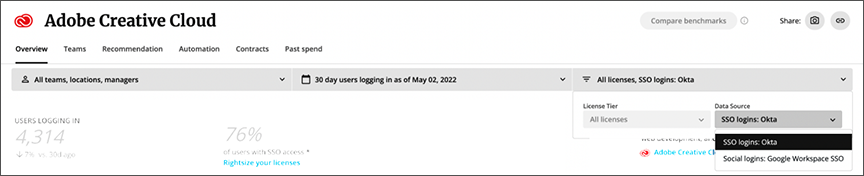
What is the main impact of this change?
This change will impact apps that do not have engagement connectors (and thus rely mainly on SSO data), but do have logins from both a managed SSO provider and Google Social. For these apps, active and provisioned license counts may change because Social activity is now separated out from the SSO view. You can view Social activity by selecting Social login activity from the drop-down.
Productiv always looks first for engagement connector data when assessing active and provisioned license counts. Therefore, if an app with Google Social login activity also has a connected engagement connector, their activity/provisioning numbers will stay the same.
Why is this important?
Understanding Social activity better will help Productiv provide a more accurate picture of app activity for all apps with Social login activity. This means we can provide both IT and Procurement users with a better view of how users are accessing apps at their institution.
Better data on active license usage -- If users can either log in to an app via Okta OR login directly into the product via Google Social, this is now more visible. You can take steps to identify the Google Social logins, and then investigate why they're happening.
More accessible recommendations -- This change makes it easier to select recommendations for apps without engagement connectors, that have managed SSO data.
Comments
0 comments
Please sign in to leave a comment.