Productiv now surfaces Salesforce permission set and managed packages data right in the Salesforce app page dashboard, providing insight on actions you may need to take in Salesforce.
Available information includes:
- Number of assigned users for each permission set (click the number to reveal the users)
- Users who have been assigned to a permission set but do not have a valid SFDC license (click the number to reveal the users). These users cannot login to Salesforce or use any assigned permission set or managed package.
Once you know that there are users who are assigned to a permission set but don't have a license, you can either assign them a license or -- if they no longer need access to that permission set -- remove their access.
Where can I see the change?
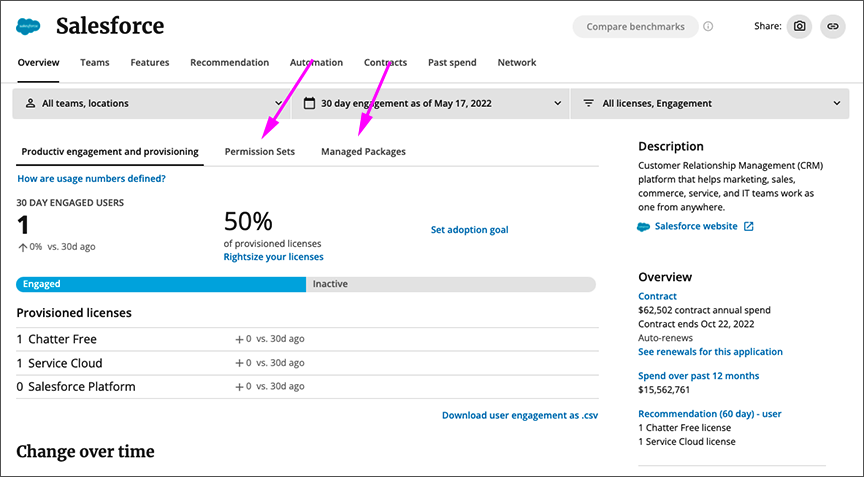
The change shows up on the Salesforce App Overview page, as two new tabs: Permission Sets and Managed Packages.
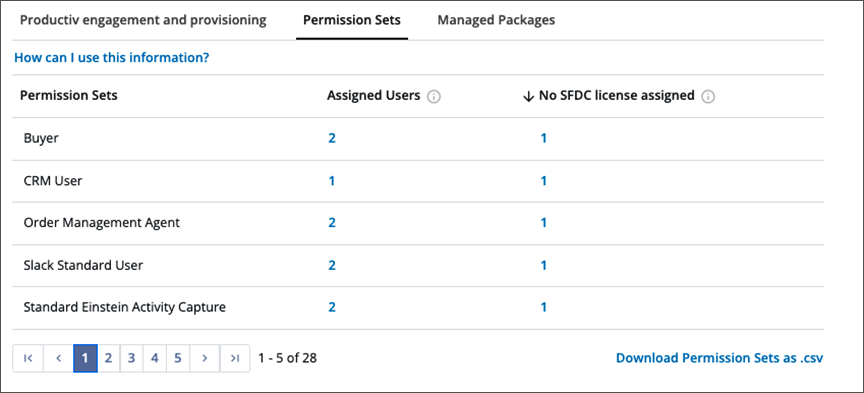
To display information on users who have assigned access to Salesforce Permission Sets, click the Permission Sets tab. Productiv displays a table that shows available permission sets, how many users are assigned, and the number of assigned users who have no SFDC license, if any.
To identify the users involved, click the number.
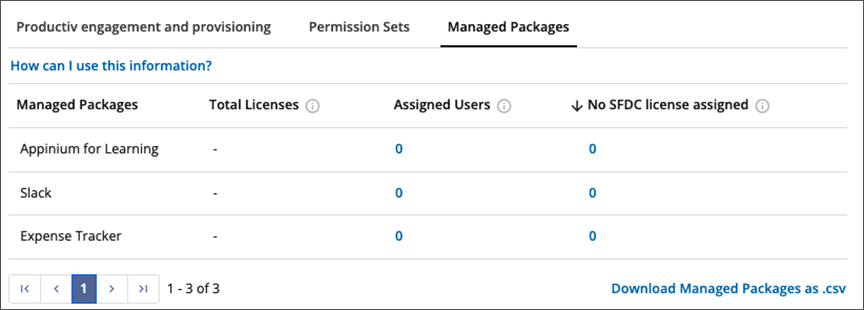
To display information on users who have assigned access to Salesforce Managed Packages, click the Managed Packages tab. Productiv displays a table that shows available managed packages, how many users are assigned, and the number of assigned users who have no SFDC license, if any.
To identify the users involved, click the number.
Comments
0 comments
Please sign in to leave a comment.