Roll-up reporting is the practice of aggregating information from all available instances of an app, into a single report. Roll-up reports appear in the App overview page (each row of the table) and in the app-specific reporting section; they help customers understand how an app is used overall, in the organization.
Formerly, roll-ups automatically included ALL available instances of the app, even if they were used in non-production instances such as a sandbox or test account. However, on May 12, 2022, Productiv upgraded app roll-ups to make it possible to exclude particular app instances from the app's roll-up view.
This enables you to clarify how the app is used at your site, in "real world" situations. You can still examine details for the excluded instances, and re-include them at any time.
Where can I see the change?
The change shows up on the App page of any app with more than one instance, as a new section below the Change over time graph.
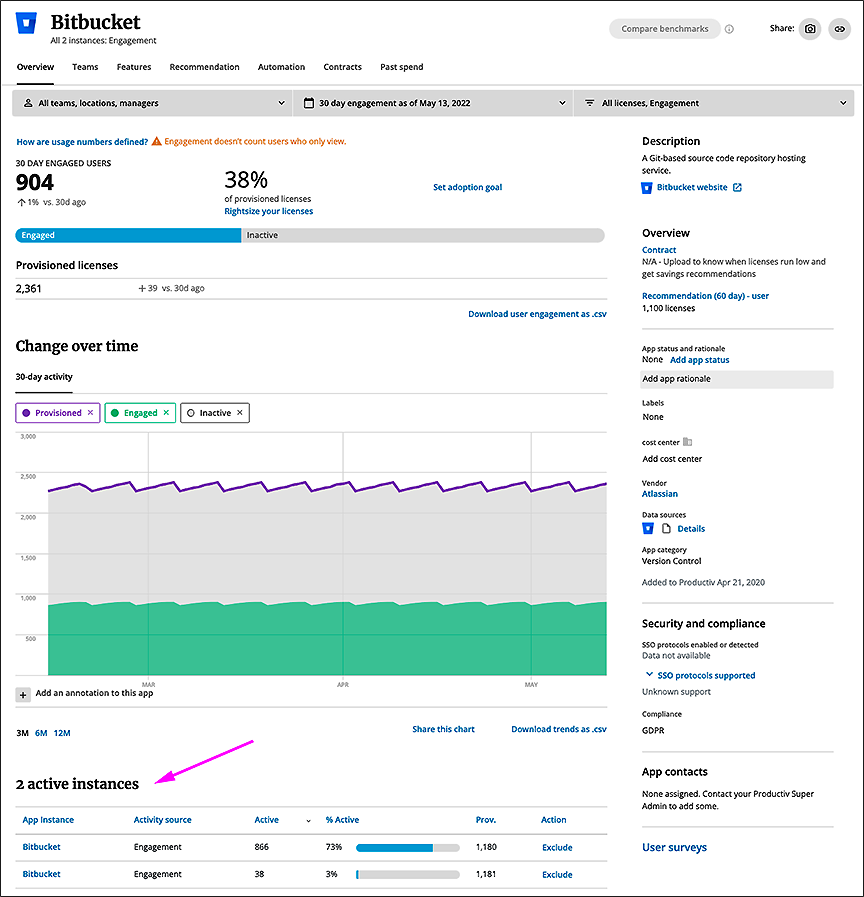
To remove an instance from app statistics roll-up:
Examine all the app instances currently included in the roll-up. If you have two or more instances you can exclude any or all of the others, one at a time.
In the listing for the instance you want to include, scroll right to the Action column and click Exclude. Productiv pops up the Exclude instance from aggregate statistics dialog.
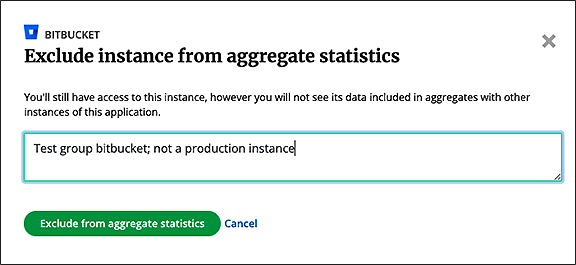
Once you click Exclude from aggregate statistics, the active instances table changes to reflect that some instances are being included in Productiv-gathered guidance, and some are not.
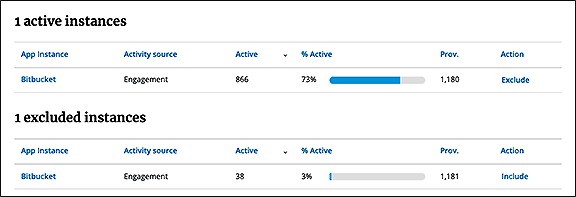
To re-include a previously excluded instance:
Return to its listing in the excluded instances table, and click include.
Comments
0 comments
Please sign in to leave a comment.