Store suggested reclaim provisioning results as a .csv file
Provisioning workflows help you to actively control licenses to avoid renewing more licenses than needed or incurring unnecessary mid-contract license true-ups.
When defining a provisioning workflow, and automatic license deprovisioning is not set up for a given application, you can choose instead to save the suggested results of these workflows as a .csv so that you can act on them independently.
This article explains the process to configure automated exports of suggested results to a shared Google Drive folder.
Requirements
In order to perform this operation, you must have permissions in Productiv to:
- update application settings
- access license reclaim workflows
How to configure Google Drive folder
- Create or identify a Google Drive folder you would like for Productiv to upload suggested user lists.
- Share the entire folder with the pre-configured Productiv service account: productiv-gsuite-drive-connect@save-license-mgmt-userlist.iam.gserviceaccount.com , as an editor.
NOTE: This service account address must be used explicitly to support this capability.
- For example:
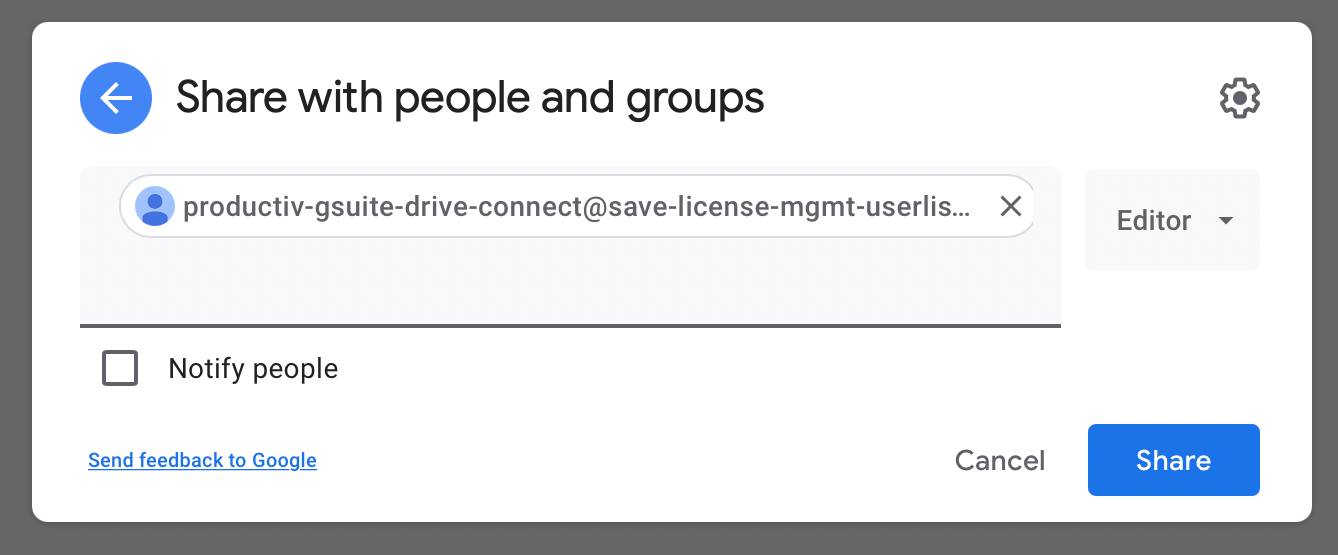
- Copy the ID of the shared folder to your clipboard. The folder ID is the last subset of characters after the last / symbol in the shared folder’s URL.
-
- For example:

- For example:
- Navigate to https://app.productiv.com/settings/organization#org-export-folder-setting in your browser.
- Paste your folder ID from step 3, then hit “Save”.
From this point onward, Productiv will periodically run a background process to upload reclaimed users as csv files for each app instance in the shared folder.
For example:

Removing Productiv Access
To gracefully remove Productiv from your Google Drive folder:
- Navigate to https://app.productiv.com/settings/organization#org-export-folder-setting in your browser. Set the “Folder ID” to an empty string, then hit “Save”.
- Navigate to the shared Google Drive folder, then remove the account access.
Comments
0 comments
Please sign in to leave a comment.