Discover how your organization is using multiple instances of an app
Organizations implement multiple instances of an app for several reasons. For example, a central IT team can manage different instances of an app used across global business units. When you set up engagement connectors to multiple instances, Productiv can more accurately represent your organization's app usage by grouping them for both a bird's-eye view across instances, as well as a single-instance view. For app usage detected through single sign-on connectors, Productiv will automatically group together multiple instances of an app.
When you set up a connector for an app that has already been connected to Productiv, you’ll have the option to provide a unique name for the new instance. You can also update the name of the instance later from the Settings page.
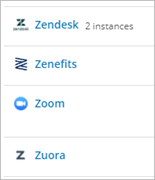
Regardless of the number of instances you have for an app, the portfolio views in Productiv only count the app as one item. You’ll see one listing for the app, along with an indication of how many instances are included.
When viewing app details, the default view incorporates all instances of the app to provide insight into how the app is used across your organization. Links to each individual instance allow you to view details for that instance.
Some app detail pages, such as Spend and Network activity, are only available at the app level, not the individual instance level, as the information applies to any or all instances of the app.
Comments
0 comments
Please sign in to leave a comment.